The Link Info can be displayed/edited for a link by selecting the link in the Albion environment and then hovering over the  Database icon to open the Database box (if not already open - note the box can also be pinned, see Albion 6 GIS User Guide). The Database box displaying link info of a selected conduit is shown below:
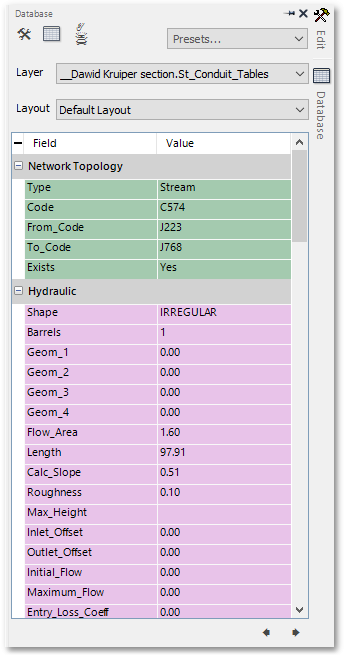
The Database box has a number of tabs, containing all the information on the specific link. The sequence and contents of the tabs are the same as discussed for the various field groups in the various link tables (see e.g. the Conduit table). The above screen-shot shows for a selected conduit, the Network Topology tab and the Hydraulic tab (the other tabs can be found when scrolling further down).
The Node Info (for nodes) can be viewed/edit similarly.