Items under Main menu > Help allow the user to:
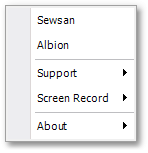
•Access the online help and tutorials of Sewsan.
•Access the Albion CAD online help.
•Access the Albion GIS online help.
•Authorize the program and activate the software licence via Help > Support > Authorize as already described in the Albion User Guide Help menu.
•Make screen recordings via the sub-menu items Record Video, Play Video and Send Video Dump (located under Help > Screen Record) as already described in the Albion User Guide Help menu.
•Get program development status.
•Get via Help > About the program version number (see Albion User Guide Help menu).
Notes on operating the help facility:
•Simply page through the help pages from one section to the next (by using the Arrow buttons located at the top right-hand side of the Help window), or simply select the section from the Table of Contents (on the Contents tab) and it will branch directly to it; and
•Once you have paged, the Back button will always move one page back.