The Model Data > Model Show/Remove > Unlinked Structures function shows special structures which may or may not be the result of drawing errors. These are structures which are situated on or near a link, but are not connected to that link. A typical example is given below:
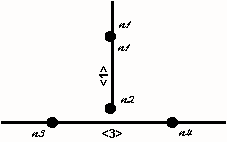
Structure 2 is situated on or very near link 3, but is not in any way hydraulically connected to link 3. This may be the result of incorrect drawing or modelling of the system. Perhaps link 3 should have been two links, both connected to structure no. 2? These potential problem structures are identified with this function. Finally, a prompt will appear whether the unlinked structure(s) should be removed.
The Show Unlinked Nodes function (similar to Unlinked Structures) is discussed in the Albion help (Albion 6 CAD User Guide > Main Menu > GIS > Network Topologies > Show Unlinked Nodes).