The selection set can be deleted by using the Model Data > Model Delete functions. These are:
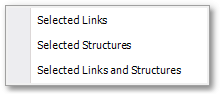
•Selected Links: When selected links are deleted, the structure associated with them remain in memory, although some of them may “float”, i.e. may not be connected to any links (see also Show Floating Structures).
•Selected Structures: When selected structures are deleted, all the links connected to the structures will be deleted as well.
•Selected Links and Structures: The selected links and structures will be deleted (similar effect as the above Selected Structures option).