The Model Data > Model Tools > Run Data Checks menu has the following options:
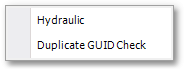
•Hydraulic: A comprehensive hydraulic check can be run on the model before conducting an analysis to ensure all required data is in place. This tool is also available as toolbar button:

If there are any errors, a Sewsan Model Errors form will appear listing the warnings and errors in the model. Selecting (clicking on) a listed item will open the relevant model layer table and select the specific model entity that needs a correction. A “warning” will be listed for model attributes which will not have an effect on the hydraulic analysis (and can therefore be ignored), but for real-world application does not make sense, e.g. the pipe invert level is above the manhole cover level.
•Duplicate GUID Check: The model can hereby be checked for duplicate Global Unique Identifiers (GUID) and there is the option to replace them with unique id's.