To start capturing/populating the empty model, click on the Add Pipe toolbar button.

This launches the Quick Model function with which pipes can be added to existing nodes or created from scratch. There are three different drawing modes, which are all used in this example.

Hover the mouse cursor over these and you will see that from left to right these are Single, Connected and Multi-Segment modes.
Select Single mode (leftmost option) in which each left-click with the mouse represents the placement of a node, and after two such left-clicks a straight pipe between the two junctions is created. So move the mouse to the upper right hand node (from node), and left-click. (The mouse cursor should auto-snap to the points on the background drawing – if not, ensure the correct snap settings are on  ). Move to the downstream point (to node) and left-click again. Do the same for all of the links forming the upper segment (of the 3 segments). I.e from the upper right hand node all the way down to the last node at the river. (We’ll first capture the Outfall as a Junction, and later will change it to an Outfall).
Repeat this procedure for each of the junctions and links moving from right to left.
If at any point you cannot clearly see your newly added pipes, hold the Ctrl key on the keyboard in while pressing on the Refresh All Layers (sun) icon in the GIS layer manager:

After the entity adding is complete, the drawing should look similar to the below image:
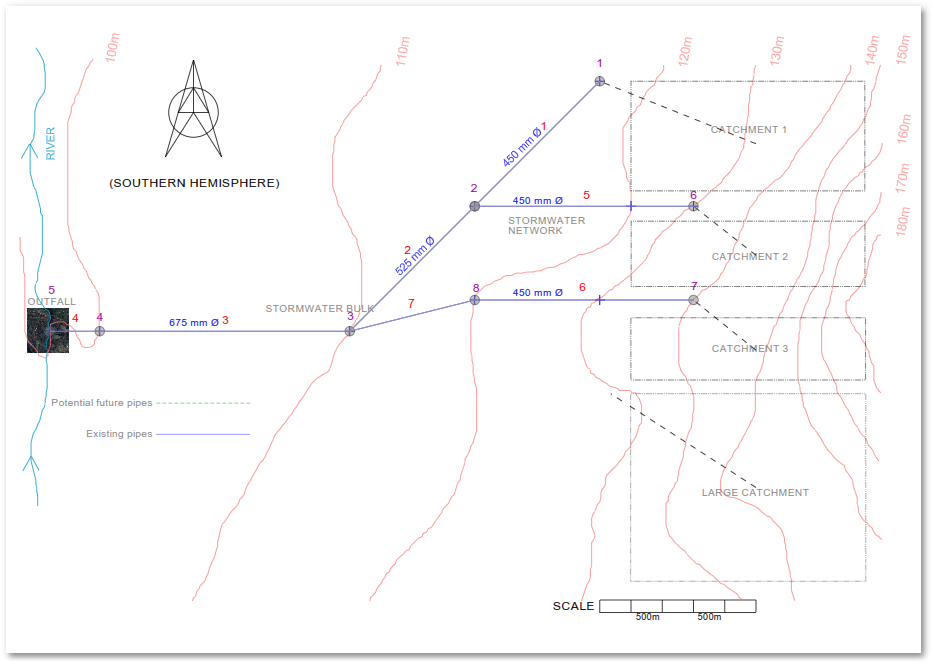
Link and node numbers are not of any real significance and are only for reference in this tutorial. All future Link and Node numbers mentioned in the Tutorial will refer to the above image.