The data on the stormwater network (i.e. Model Data) can be viewed and edited in a number of ways e.g.:
•Using the spreadsheet type table editors accessible via Model Data > Model Tables.
•Using the built-in Albion environment, to displayed the data graphically, and to edit individual links or structures or batch edit selected links/structures.
The data on the stormwater network is handled by HydroSWMM via the following tables (accessible via Model Data > Model Tables). These are:
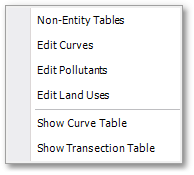
Note, the following menu items add tables in the GIS Layer Manager (to be viewed using right-click and then select Edit Database from the ensuing menu):
Note, the following are tables that can currently only be viewed in the GIS Layer Manager (via right-click and then select Edit Database from the ensuing menu):
The layout of these spreadsheet type editors are all very similar. The common functionality built into these tables such as e.g. find/replace, filters, printing, exporting, memo fields, etc. are discussed in more detail in the Albion 6 GIS User Guide (see Albion 6 GIS User Guide > User Interface Elements > Database Table).