The calculators can be used either in standalone form as an unlinked reference tool, or they can be linked and saved to a particular catchment. The catchment based on catchment code from the first drop down. This approach is carried through all of the available calculators. The process to be followed in using the Rational Method Calculator is as follows:
1.Select the appropriate Catchment Code from the drop-down list;
2.Select the Catchment Terrain Type;
3.Select the Rainfall Intensity Method to be used (Alternate 1 & 3 require the Point Rainfall to be calculated externally);
4.Select the appropriate Watercourse Type to be used in the calculation;
5.Based on the options selected above, the form will grey-out various non-applicable sections, complete the Run-off Coefficient section corresponding to your selection. The Edit boxes will update with the selections chosen from the drop downs, however the values can be manually edited should the user wish to do so;
6.Complete the Calculation of Rainfall Intensity Section for the applicable Rainfall Intensity Method. If Alternate 2 is selected, the user may have to enter the TR102 parameters for interpolation depending on the storm duration entered. The Areal Reduction Factor and Point Rainfall are calculated at the end of the form. The Catchment Area can be updated from the catchment geometry for the catchment selected;
7.Complete the Time of Concentration section based on the choice made at the beginning of the form. Please note that the geometry update functionality for this section will be activated in future releases;
8.The user may now click the Calculate Peak Flow button. The conduit cross sectional area can be entered should the user wish to estimate the peak flow velocity;
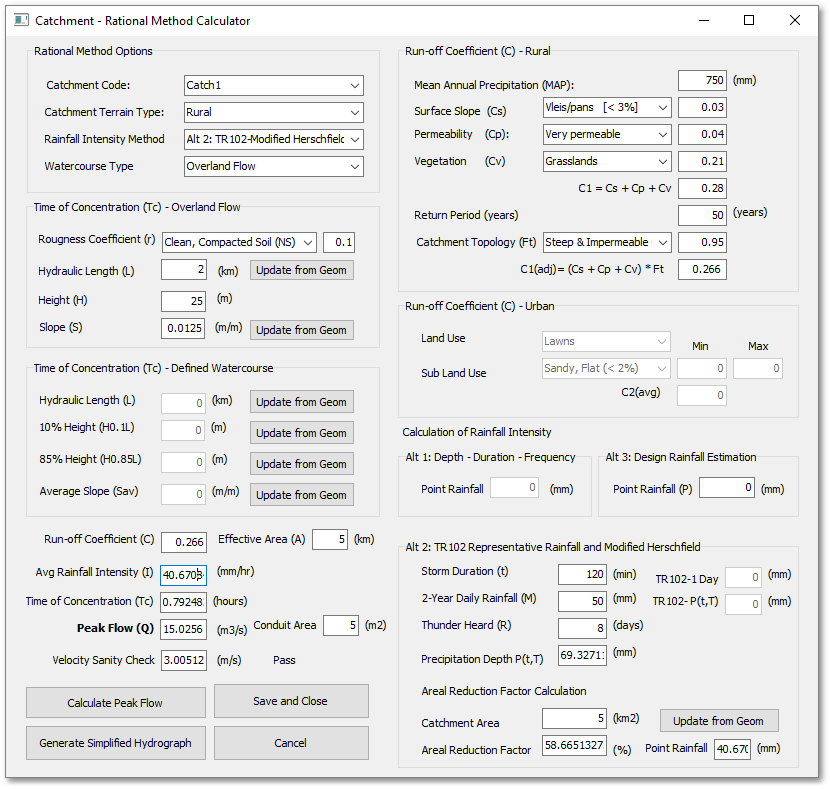
9.Using a Simplified Hydrograph approach, a time-series can be added based on the Time of Concentration and Peak flow, Click OK to accept and save or Cancel to discard;

10. Should the user wish to save the form data, the Save and Close button can be clicked, which will link the data to the selected catchment. The next time the form is opened, if the same catchment is selected the form will be populated with the saved data.