In practice, pipe invert level information is not always available. As a preliminary measure, minimum pipe slopes are therefore assigned to the pipes by default. However, pipe data can easily be edited/updated when, for example, new field survey data becomes available. In this step, we will edit the data of two pipes, and assign slopes to them, based on real data.
There are two options available to edit the slopes, based on real data. The first is to enter invert levels at the upstream and downstream ends of a pipe. The slope is then calculated as the difference in invert levels, divided by the length of the pipe. The second is to enter the actual slope. In this example, we will follow the latter method.
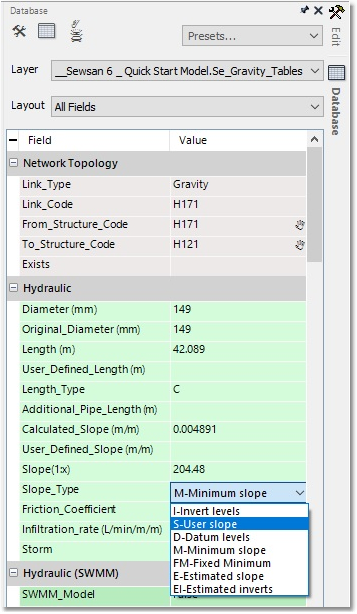
Select the pipe between Manhole H171 and Manhole H121. Then, in the Database editor, change the Slope_Type to ‘S’, as shown below:
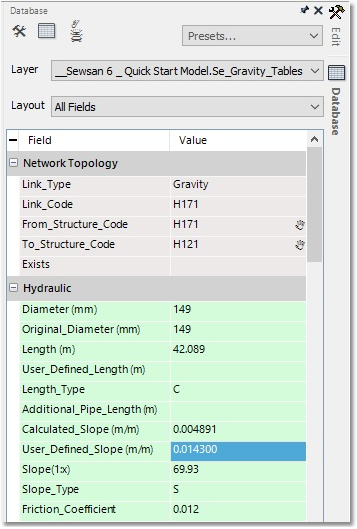
Then, change the User_Defined_Slope (m/m) field value to 0.0143 (the unit is m/m). Notice that the Slope(1:x) field was updated automatically to the inverse value (69.93 for this example) of the entered value. The Slope(1:x) field displays the horizontal distance, i.e. x, for every 1 unit vertical change in elevation (the unit is m).
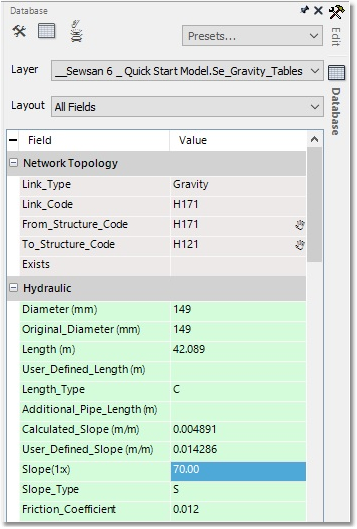
Now, change the Slope(1:x) field value to 70. Notice that the User_Defined_Slope (m/m) field has updated automatically (0.014286 for this example). These two fields can be used interchangeably, depending on the preferred unit for slope.
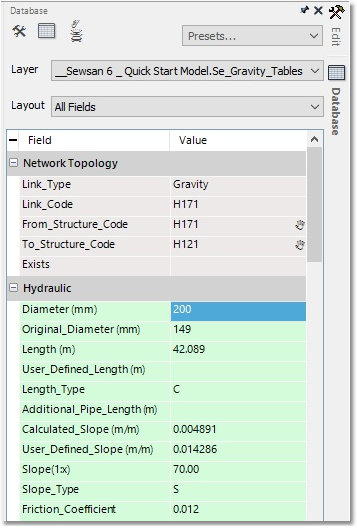
Finally, we can edit the diameter of this pipe by changing the Diameter (mm) field value to 200. Edit the Diameter (mm) field values of the remaining four pipes in a similar manner.
If we had rather wanted to enter invert levels, then the Slope_Type would have had to be changed to ‘I’, and the From_Invert_Level (m) and To_Invert_Level (m) fields would have needed to be populated. The Calculated_Slope (m/m) field value would then have been updated automatically with the new slope of the pipe.
Note the N icon to the right-hand side of the From_Structure_Code and To_Structure_Code fields’ values. Clicking on this icon will run a function that is specific to the selected field. APPENDIX A lists all field descriptions, and the function for the N icon, if applicable.