The Design Process can be started by selecting from the main menu Analysis > Time Simulation > Run Design. The Planning Analysis box will appear:
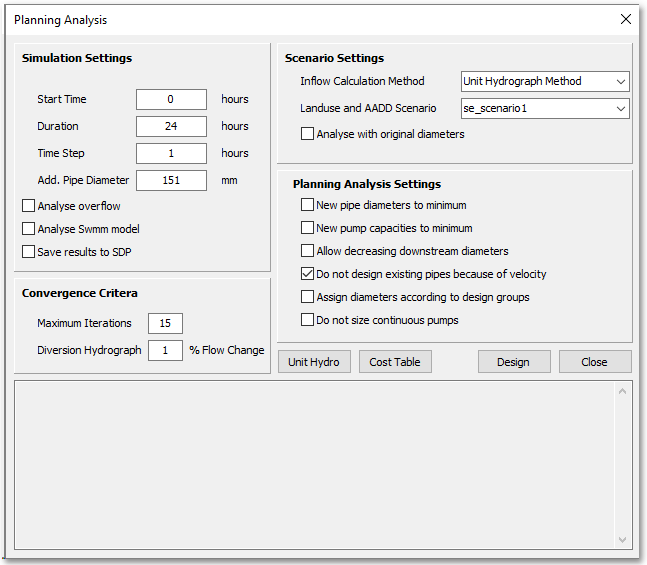
Note: The background colour of the Planning Analysis Settings area of the form is no longer dark grey, indicating that it is editable when running a Design.
Planning Analysis Settings
•New pipe diameters to minimum: Allows the designed diameters of new pipes to be smaller than the initial diameters set by the user. Tick this only if you are sure it is an intended design decision.
•New pump capacities to minimum: Allows the designed pump capacities of new pumps to be less than the initial pump capacities set by the user. Tick this only if you are sure it is an intended design decision.
•Allow decreasing downstream diameters: Allows diameters to decrease from an upstream pipe to a downstream pipe. Tick this only if you are sure it is an intended design decision.
•Do not design existing pipes because of velocity: If this option is turned on then the diameter must be such that full bore velocity is more than a user-defined minimum velocity for the pipe (typically 0,65 m/s). If the option to use this criterion for existing pipes is off and the velocity is less than the minimum velocity, the user will still be warned.
•Assign diameters according to design groups: If this option is turned on (for a design run), the diameters of pipes assigned to a design group, will all obtain the same diameter.
•Do not size continuous pumps: If this option is turned on, pumps of type Continuous will not be sized during design.
Finally when all the above options are set, the Design button can be clicked. Sewsan will perform the hydraulic checks and design input parameter checks before commencing with the Design analysis. If there are errors, the Design will not start, and an error form will appear to allow the user to make the required corrections.