Sewan applies a special integrated Storm Water Management Model (SWMM) of the Environmental Protection Agency (EPA) for the modelling of flow though parts of the sewer network (i.e. a certain pipe route) where there are pipes/culverts with complex profiles - such as egg-shaped sewer pipes, trapezoidal culverts, parabolic culverts and many others. The SWMM hydraulic model has also been incorporated to analyse critical sections of a model. This generally includes areas where drop structures or sudden changes in slope occur. The flow-depth ratio analysis results obtained from this integrated SWMM model are automatically incorporated into the Sewsan spare capacity results. The integrated SWMM analysis can be run on the model via the following steps:
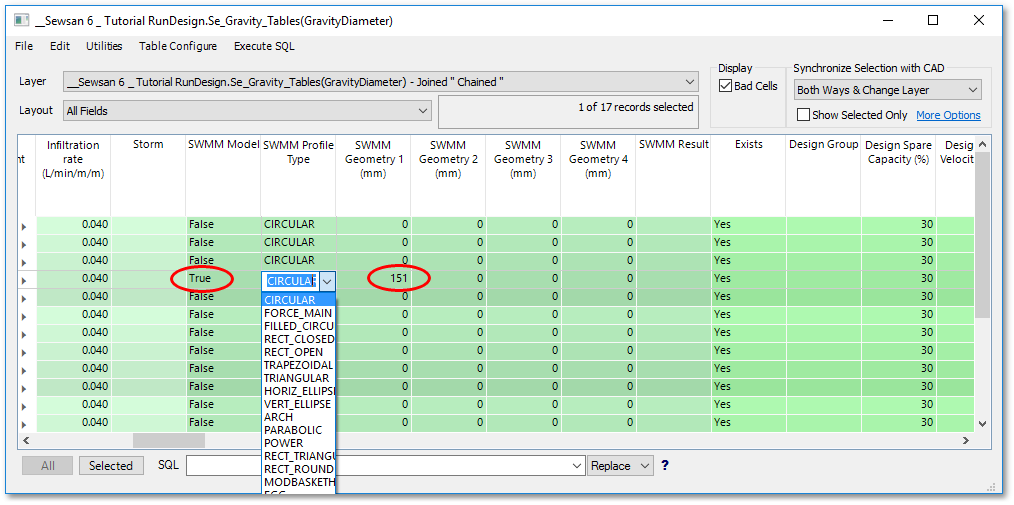
•The user can select the SWMM Profile Type (see Appendix B for basic SWMM profile types) from a drop-down list in the Gravity Pipe table or from the Database box at the Hydraulic SWMM field group.
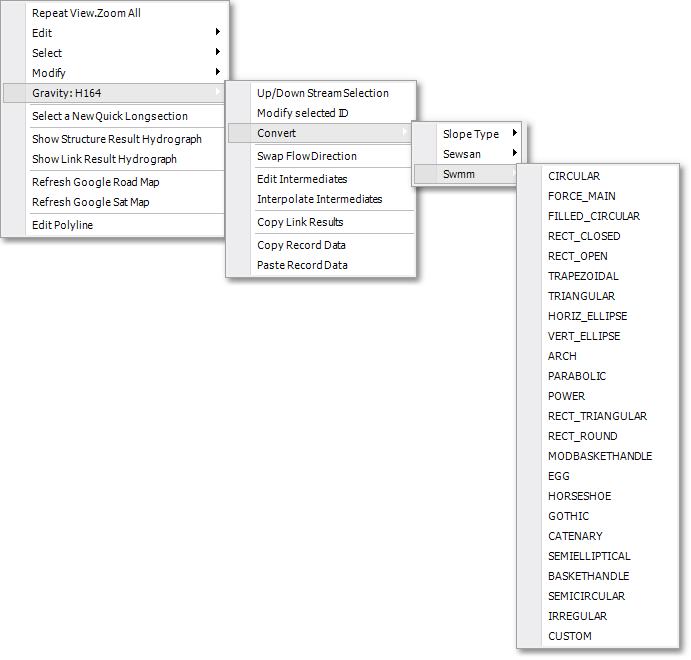
•Alternatively, a normal gravity pipe can be converted to an SWMM profile for the SWMM model, by right-clicking on the pipe and selecting from the following right-click menu:
•For pipes to be analysed with SWMM, the SWMM Model field in the Gravity Pipe table must be set True (see topmost screen-shot).
•For circular profiles one dimension - i.e. the diameter must be entered, viz. SWMM Geometry 1 (see topmost screen-shot). For the other complex profiles (see Appendix B) more dimensions, viz. SWMM Geometry 1..4 are required.
•An SWMM analysis furthermore requires From Invert Level and To Invert Levels for the pipes to be entered.
•For the pipe route to be analysed with SWMM, a valid endpoint is required such as End Manhole, WWTP, Septic Tank/Interceptor Tank/Conservancy Tank or SWMM Outfall. The latter, is a special structure type that can serve as a valid endpoint for the SWMM analysis, but act as a standard manhole when conducting a Sewsan analysis.
•Note that diversion structures are not supported in this built-in partial SWMM Analysis module.
•Finally to start the SWMM analyis, the Analyse SWMM model tick box of the Analysis box must be ticked before clicking the Simulate button (also located in the Analysis box).
See also Run SWMM Simulation to run a full external SWMM simulation.