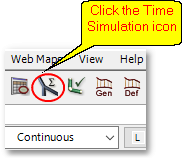
Once the system data has been entered/opened/edited the user can first run hydraulic checks on the system to ensure all necessary data is in place, before commencing with the hydraulic computation of the flow (and velocity). The latter is achieved by selecting from the main menu Analysis > Time Simulation > Run Simulation or from the toolbar as shown below:
The Analysis box will appear:
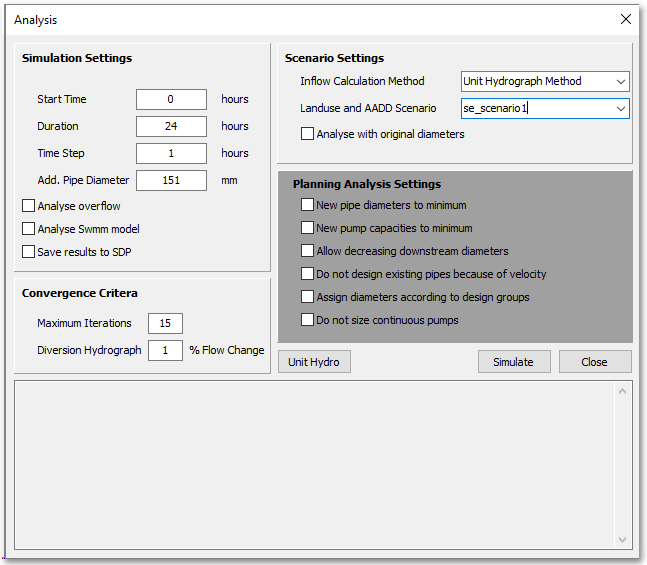
Note: The dark grey non-editable area is not used for a standard time simulation. These settings are only used during a planning analysis (design).
Simulation Settings
•Start Time: This is the time at which the simulation should start. You will usually start at hour zero.
•Duration: The duration of the simulation. You will usually use a 24 hour simulation.
•Time Step: The time between each iteration of the algorithm. Decreasing this value will increase the accuracy of the results with a reciprocal increase in the time taken to run the simulation. Typically 1 hour is used.
•Add. Pipe Diameter: This is the diameter to be used when modeling additional pipes.
•Analysis Overflow: This determines whether overflows should be calculated at bottlenecks or not.
•Analyse SWMM model: This enables (for advanced users) an integrated SWMM analysis of the part of the model for which the SWMM_Model field in the Gravity Pipe table is set as True.
•Save results to SDP: This exports an old format model, with results file, to the same location of the active model.
Scenario Settings
•Inflow Calculation Method: This describes the primary method that sewer flow is calculated at its origins. If set to AADD, then the sewer flow is a function of the Average Annual Daily Demand. If the scenario is set to Unit Hydrographs, then sewer flow is a function of the Unit Hydrographs assigned to structures. (For the Tutorial, set to Unit Hydrographs).
•Landuse and AADD Scenario: There are 3 different land use scenarios available. This example only has data for one land use scenario, viz. se_scenario1.
Convergence Criteria
•Maximum Iterations: The maximum number of iterations that will be performed in order to find a solution in a simulation or planning analysis.
•Diversion Hydrographs Percentage Flow Change: The required minimum percentage change in flow through a diversion structure between iterations. If the percentage change in flow varies at any diversion structure by more than this value, another simulation iteration is performed. For this example specify a Diversion Hydrographs Percentage Flow Change of 1%.
When all the settings are correct click on the Simulate button in the form to start the simulation.