The Model Data > Model Selection > Select Catchment from Structure function selects all links/structures in the catchment upstream/downstream of a specified (selected) structure. The function prompts for the structure to be selected (on which the catchment selection will be based on) and opens the Type Selection box, in which the following can be set:
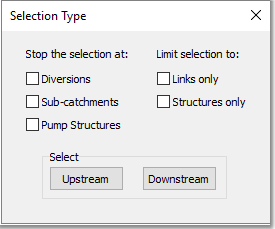
•Stop the selection at: The structure type, apart from manholes, which should mark the end of the upstream/downstream catchment, can be selected from the three tick boxes.
•Limit selection to: The respective tick box can be ticked for the function to select either links or structures only.
•Select: The Downstream button can be clicked to select only links/structures downstream of the specified structure. Whereas the Upstream button can be clicked to select only links/structures upstream of the specified structure.