In this step, we will add Water Demand and Land Use information to the model.
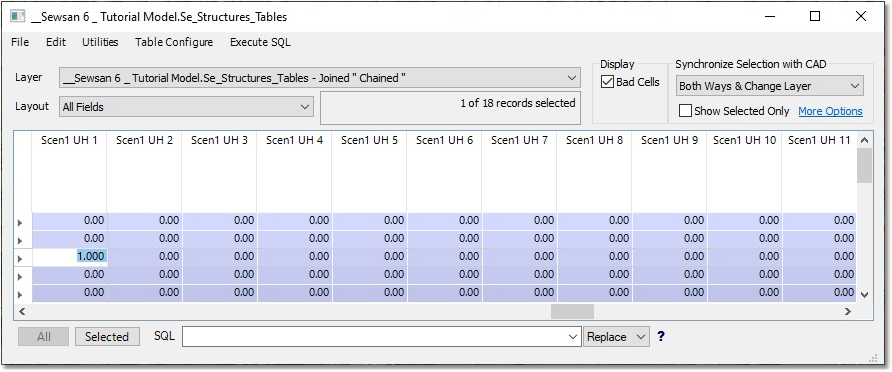
AADD and UH data must often be entered manually, or imported from a spreadsheet. The following is a screen-shot of a typical data-entry session. It would be tedious to enter all these values now, but take note that in the future, this is how you will have to enter this data. The percentage AADD for each structure is usually left at 100%, which indicates the percentage of water usage to be considered for sewer flow production. Each Land Use type has a percentage associated with it, used to determine the sewer flow from the corresponding water usage, and this value is typically between 50 and 70 percent. This land use AADD percentage is part of the Unit Hydrograph data, which can be loaded in and then viewed/edited in the Unit Hydrograph editor (later in this tutorial). The computed sewer output for every structure is calculated as the input AADD for that particular structure, multiplied by the particular land use AADD percentage, multiplied by the structure’s AADD percentage.
The following two screen-shots are merely for illustrative purposes. You can continue editing your tutorial model again from the third screen-shot, as shown below (it will be clearly indicated when you need to edit something again):

Sewsan has the capacity to store data for three Land Use Scenarios within a single Sewsan sewer system. For each of the three available Land Use Scenarios, the AADD, AADD Percentage, and UH units (land parcel data serviced by a pipe) are entered into separate fields, in the Structure table. The field names are prefixed with either “Scen1”, “Scen2” or “Scen3”, in the default layouts provided. At simulation time, you can choose which of the three Land Use Scenarios you wish to use.
For example, one could use Land Use Scenario 1 for the Existing Occupation of erven, and Land Use Scenario 2 for Fully Occupied erven.
Please take note, the tutorial editing session resumes from this point:
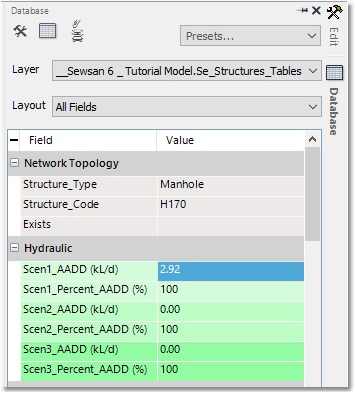
Select (click on) Manhole H170. In the Database box, navigate to the Scen1_AADD (kL/d) field, and enter 2.917. Then, in the fields Scen1_UH_1 and Scen1_UH_2, enter 1 (no. of equivalent erven). Finally, ensure that the Scen1_Percent_AADD (%) field value is set to 100%.
The manhole information should appear as follows for the Hydraulic field group, in the Database box:
Scrolling further down in the Database box, the manhole information should appear as follows for the Unit Hydrographs (Scenario 1) field group:
