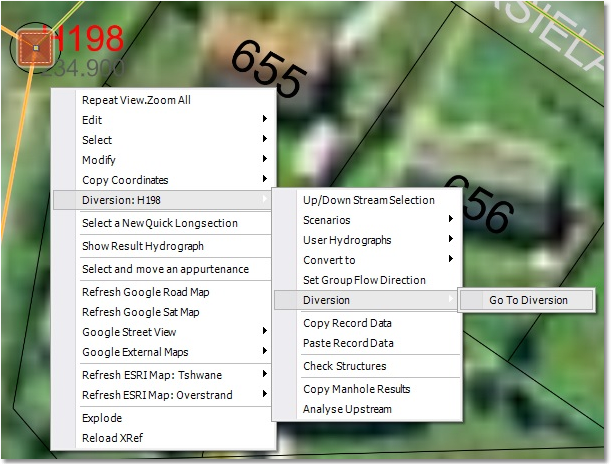
For each diversion structure, the percentage of the incoming flow that is diverted to each of the downstream structures, i.e. flow into the downstream gravity pipes, is set in the non-geometric diversion table. The diversion table allows up to 10 diversion percentage settings for incremental flow values. In order to quickly select the correct diversions, right-click on the associated Diversion structure (Diversion H198 in this case), and navigate to Diversion: H198 > Diversion > Go To Diversion, as shown below:
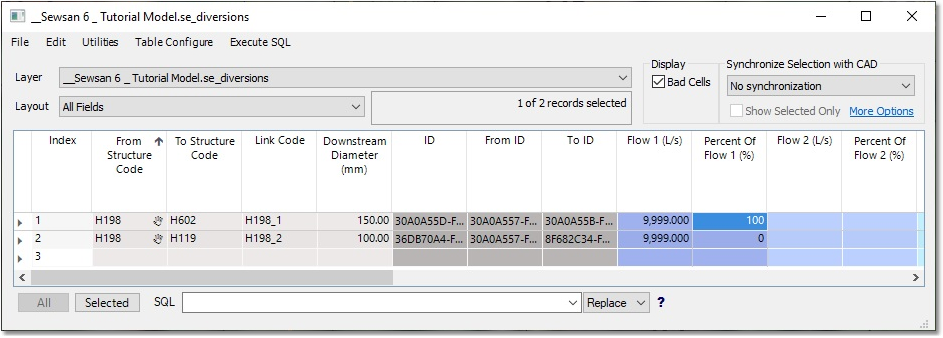
Set the Percent Of Flow 1 (%) to 100% for the gravity pipe connecting Manhole H198 to Manhole H602, and to 0% for the gravity pipe connecting Manhole H198 to Manhole H119. The incoming flow, up to the value in Flow 1 (L/s), will be diverted into the downstream pipes by the percentages entered in Percent Of Flow 1 (%). The sum of the percentages for a single diversion structure (records with the same From_Structure_Code in the Diversion table) has to be equal to 100%.
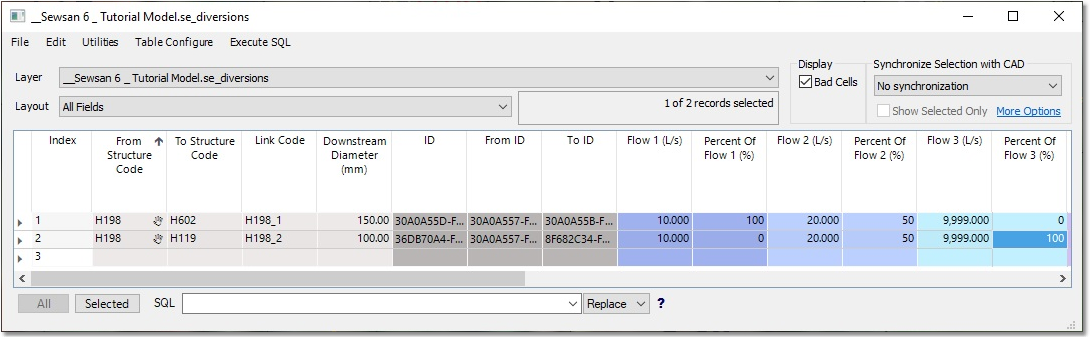
Consider the following example to illustrate how flow is diverted with flow-percentage groups within Sewsan. You can continue editing your tutorial model again from the next section.
Suppose we have a diversion with two downstream pipes, Pipe X and Pipe Y; suppose, for instance, that all flow should flow into Pipe X, up to a flow value of 10 L/s, and then for additional flow above 10 L/s, up to a value of 20 L/s, you want the flow to be split 50/50 between Pipe X and Pipe Y, with all flows above 20 L/s flowing into Pipe Y. Now, substituting Pipe X with Pipe H198_1, and Pipe Y with Pipe H198_2, the above example would be set in the diversion table as shown below:
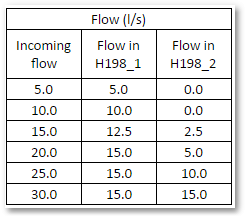
See the table below that shows how the flow will be diverted to the downstream pipes for increasing flows, for the above example: