It is often very useful to export a HydroSWMM model to a GIS. You can then manipulate the GIS version of the model (e.g. move structures/links to their correct position with regards to an underlying GIS or image, also make use of the powerful CAD/GIS selection functions). This updated GIS model can then be imported again into HydroSWMM for further stormwater analyses. HydroSWMM also supports exporting of the model to the SWMM software package for further detailed stormwater analyses.
The following exporting function are available, via Model Data > Model Export:
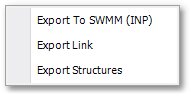
•Export to SWMM (INP): Offers functionality to export the model to the SWMM software package (via the INP file format).
•Export Links: Can be used to export all links in the model to GIS shapefile format. The model data fields, to be included in the attribute table of the shapefile, can be selected in a special dialog box.
•Export Structures: Can be used to export all structures in the model to GIS shapefile format. The model data fields, to be included in the attribute table of the shapefile, can be selected in a special dialog box.