As mentioned earlier, the slope type of a pipe is dependent on the available information. Up to this point, all gravity pipes have the default setting of “M” (minimum) for slope type, and the slope is calculated as the required slope to reach self-cleansing velocity, under full flow conditions, for the diameter of the pipe.
Select Pipe H173 (or Pipe 1, if the codes were not imported in the previous step), and enter the values for the upstream and downstream invert levels, as shown below (either by opening the Gravity pipe table, or in the Database box on the right):

Now navigate to the Slope_Type field, and select “I-Invert levels” from the drop-down list.
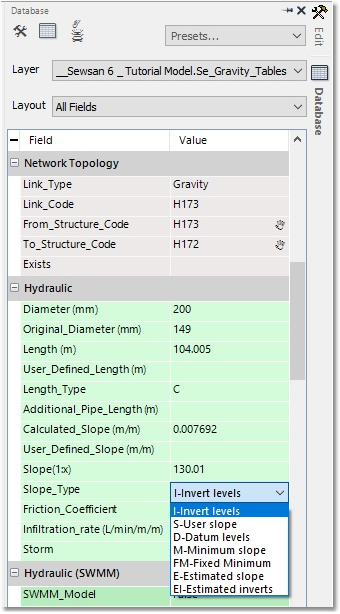
The Calculated_Slope (m/m) field value is 0.007692, as calculated from the difference in level between the upstream and downstream inverts of the pipe, and the pipe’s length. Notice that the Slope(1:x) field was updated automatically to the inverse value (130.01 for this example) of the calculated value. The Slope(1:x) field displays the horizontal distance, i.e. x, for every 1 unit vertical change in elevation (the unit is m).
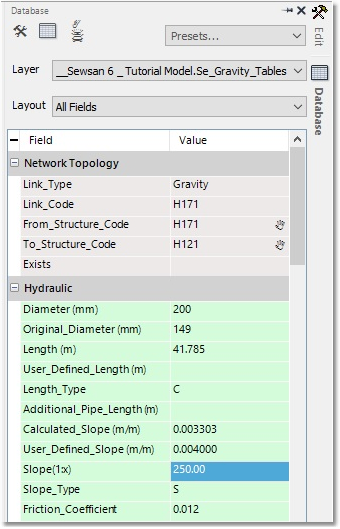
Next, select Pipe H171 (or Pipe 3), and select “S-User slope” from the Slope_Type field drop-down list, in the Database box. The focus is then shifted to the Slope(1:x) field. Enter a value of 250. Notice that the User_Defined_Slope (m/m) field has updated automatically to the inverse value (0.004000 for this example). These two fields can be used interchangeably, depending on the preferred unit for slope. The “S” (User slope), “FM” (Fixed Minimum slope), and “E” (Estimated slope) slope types will all use the value entered into the User_Defined_Slope (mm) field during an analysis.