Items under Main menu > Model Data allow the user to:
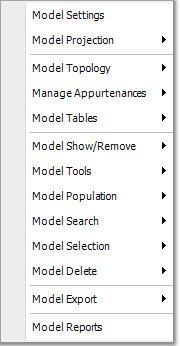
•Model Settings can be used to set up a project, which includes specifying job name, maximum number of iterations (solver), network numbering convention, etc.
•Model Projection assigns and converts model projections.
•Model Topology can be used to enter or edit the model data in the Albion environment via special topological functions.
•Manage Appurtenances allows the user to add, import or modify model appurtenances.
•Model Tables opens tables to enter or edit the model data through the use of spreadsheet type tables.
•Model Show/Remove detects/removes various network faults and special aspects of the network such as duplicate links, intersecting links, looping links, duplicate vertices, unlinked structures and floating structures.
•Model Tools provides options for hydraulic checks, user data checks, network renumbering and copy model data functionality.
•Model Population provides specialised functions for demand extraction from spatial information and demand spreading across the hydraulic model. These functions are subject to additional licensing options.
•Model Search offers search functionality to find links or structures.
•Model Selection provides numerous model selection tools to select e.g. connected links from structure, connected structures from links, etc. There is also a comprehensive selection filter and sub-menu option to save the selection.
•Model Delete deletes selected links/structures.
•Model Export exports the model data into various formats such (as older Sewsan 5 formats and GIS).
•Model Report generates a report of the model data.
The Definition of hydraulic analysis terms, Definition and Editing of Model Data and Field Descriptions sections give detailed descriptions of the model data terms, definitions and tables (see also system input and display of results in the Albion environment).